If you have shipped a contract on any EVM chain, you already know most of what Aevum Testnet asks of you. Getting started is mostly configuration.
You need the correct chain ID and RPC endpoint, a small amount of test gas, and the habit of checking which network your wallet is on before you sign anything.
This guide takes you through those steps in order, from adding the network to verifying your first contract, and points to the QDay Wiki wherever the official docs go further.
What you are connecting to
Aevum represents the next generation of the QDay architecture.
At its core, it is an L2 chain built upon the CDK (Chain Development Kit) and Abelian(a Layer 1 blockchain that utilizes the PoW-based, quantum-resistant protocol).
Aevum employs a modular architecture and a "pessimistic proof" rollup scheme, featuring specialized components dedicated to sequencing, aggregation, and verification.
QDay’s suite of functionalities—including payments, smart wallets, AI agents, and quantum-resistant capabilities—are all constructed upon this foundation.
For day-to-day building, the part that matters is simpler.
Aevum is EVM-compatible, so Solidity, MetaMask, Remix, Foundry, Hardhat, ethers.js, viem and wagmi all work as they do on Ethereum. The only thing you change is where your tools point.
One detail catches people out.
Aevum Testnet is a separate network from the original QDay network (labelled QDay Origin in the docs), with its own chain ID, RPC and explorer. Contracts and balances do not carry over automatically.
If you deployed something on the original network, redeploy it on Aevum. Standard Solidity contracts generally need no code changes (FAQ 2.10).
Step 1: Add Aevum Testnet to your wallet
The quickest route is the Add QDay Aevum button on the wiki’s Add QDay to your wallet page. It uses EIP-3085 (wallet_addEthereumChain), so your wallet shows the exact parameters for approval before anything is added.
If you prefer to do it by hand, open MetaMask, go to Networks, choose to add a network manually, and enter these values:
| Field | Value |
|---|---|
| Network name | QDay Aevum |
| Chain ID | 44005 (hex 0xABE5) |
| RPC URL | https://rpc-test.qday.info |
| WebSocket | wss://rpc-test.qday.info |
| Block explorer | https://explorer-test.qday.info |
| Currency symbol | tQDAY (native testnet $QDAY, 18 decimals) |
Three QDay chain IDs are in use right now, and mixing them up is the most common setup error. 44001 is the original network’s mainnet, 44003 is the original network’s testnet, and 44005 is Aevum Testnet.
Aevum mainnet values will be published at launch. Check against the Chain parameters page, not a chat message or a dApp banner.
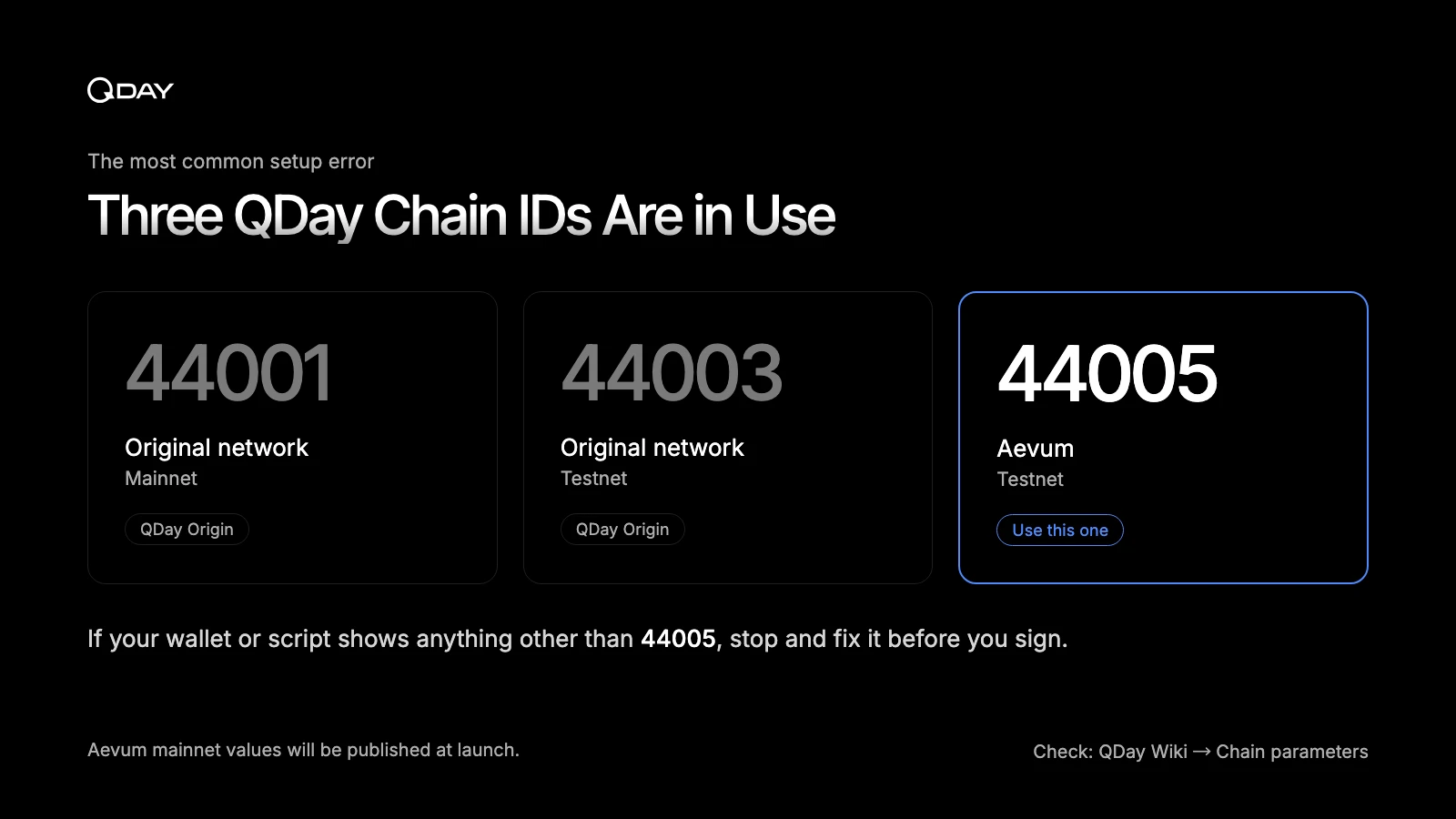
If your wallet or script shows a chain ID other than 44005, stop and fix it before you sign anything.
Step 2: Get testnet tokens
Testnet $QDAY pays for gas on Aevum. It has no monetary value.
The faucet is built straight into the wiki on the Get testnet tokens page. Connect your wallet and the widget switches you to Aevum and calls the faucet contract directly.
The contract address (0xE5074CBbd046AFb491EB8692abD6cF7ECCC6dEE5) is listed on the Official contract addresses page if you want to check it on the explorer first.
A few things are worth knowing before you click.
Claiming through the in-docs widget is itself a transaction, so a brand-new wallet with a zero balance cannot pay for it. For your very first claim, use faucet.qday.info, which covers the gas for you. After that, the widget works normally.
The faucet also enforces a per-address cooldown on-chain, and it only accepts claims from a regular wallet (an EOA), not from a contract. If you claimed recently, the widget tells you how long to wait.
If you are running a team or a hackathon squad, have each person claim to their own address rather than routing everything through one shared key.
Gas on Aevum follows the Ethereum EIP-1559 model (base fee plus priority fee), so existing gas estimation logic carries over unchanged.
Before deploying, it is worth sending a small amount between two of your own accounts to confirm you can sign, pay gas and read the result on the explorer.
The Handbook’s Getting Started page has a step-by-step version of that first transfer.
Step 3: Deploy your first contract with Remix
Remix is the fastest way to see a contract live on Aevum, because it needs nothing installed beyond MetaMask. Here is the minimal contract from the Handbook:
// SPDX-License-Identifier: MIT
pragma solidity ^0.8.20;

contract HelloQDay {
    string public greeting = "Hello, QDay";

    function setGreeting(string calldata _greeting) external {
        greeting = _greeting;
    }
}
- Open remix.ethereum.org and create
contracts/HelloQDay.sol. Paste the code above. - In the Solidity Compiler panel, choose 0.8.20 or newer to match the pragma, then compile.
- In Deploy & Run Transactions, set Environment to Injected Provider - MetaMask (not Remix VM) and approve the connection.
- Look at MetaMask before going further. It should say QDay Aevum, chain ID 44005. If it is still on Ethereum, the contract deploys there and you pay real ETH.
- Select HelloQDay, click Deploy, check the gas estimate in MetaMask, and confirm.
- Once it confirms, expand the deployed instance, call greeting, then call setGreeting with a new string and read it back.
- Paste the contract address into the Aevum explorer to see the deployment and every call after it.
Step 4: Deploy from Foundry or Hardhat
Once you move past a single file, you will want your usual toolchain.
Nothing about Aevum requires plugins or forks, only the testnet endpoint. Use a dedicated testnet key kept in an environment variable, never a key that holds real funds.
Foundry
forge create src/MyContract.sol:MyContract \
  --rpc-url https://rpc-test.qday.info \
  --private-key $PRIVATE_KEY \
  --broadcast
Recent Foundry releases treat forge create as a dry run unless you pass --broadcast, so include it if nothing appears on the explorer.
Hardhat
// hardhat.config.js
module.exports = {
  networks: {
    aevum: {
      url: "https://rpc-test.qday.info",
      chainId: 44005,
      accounts: [process.env.PRIVATE_KEY],
    },
  },
};
npx hardhat run scripts/deploy.js --network aevum
Setting chainId explicitly is a cheap safeguard. Hardhat will refuse to send if the RPC reports a different chain.
viem and wagmi
For a frontend, define the chain once and reuse it everywhere:
import { defineChain } from 'viem';

export const aevumTestnet = defineChain({
  id: 44005,
  name: 'QDay Aevum',
  nativeCurrency: { name: 'QDAY', symbol: 'QDAY', decimals: 18 },
  rpcUrls: { default: { http: ['https://rpc-test.qday.info'] } },
  blockExplorers: {
    default: { name: 'Explorer', url: 'https://explorer-test.qday.info' },
  },
  testnet: true,
});
One caution when you copy from the docs.
Several code samples in the wiki’s Technical section, including the Smart Contract Development page, use https://rpc.qday.io and chain ID 44001. Those are the original network’s mainnet values.
For Aevum Testnet, swap in https://rpc-test.qday.info and 44005.
Step 5: Verify your contract
The Aevum explorer runs on Blockscout, so the standard Blockscout verification flow applies. With Foundry:
forge verify-contract \
  --chain-id 44005 \
  --verifier blockscout \
  --verifier-url https://explorer-test.qday.info/api \
  <CONTRACT_ADDRESS> \
  src/MyContract.sol:MyContract
Verified source shows up on the contract’s explorer page, which makes it much easier for teammates, judges or reviewers to read what you deployed. More detail is on the Contract Verification page and in FAQ 4.3.
What you can and cannot test yet
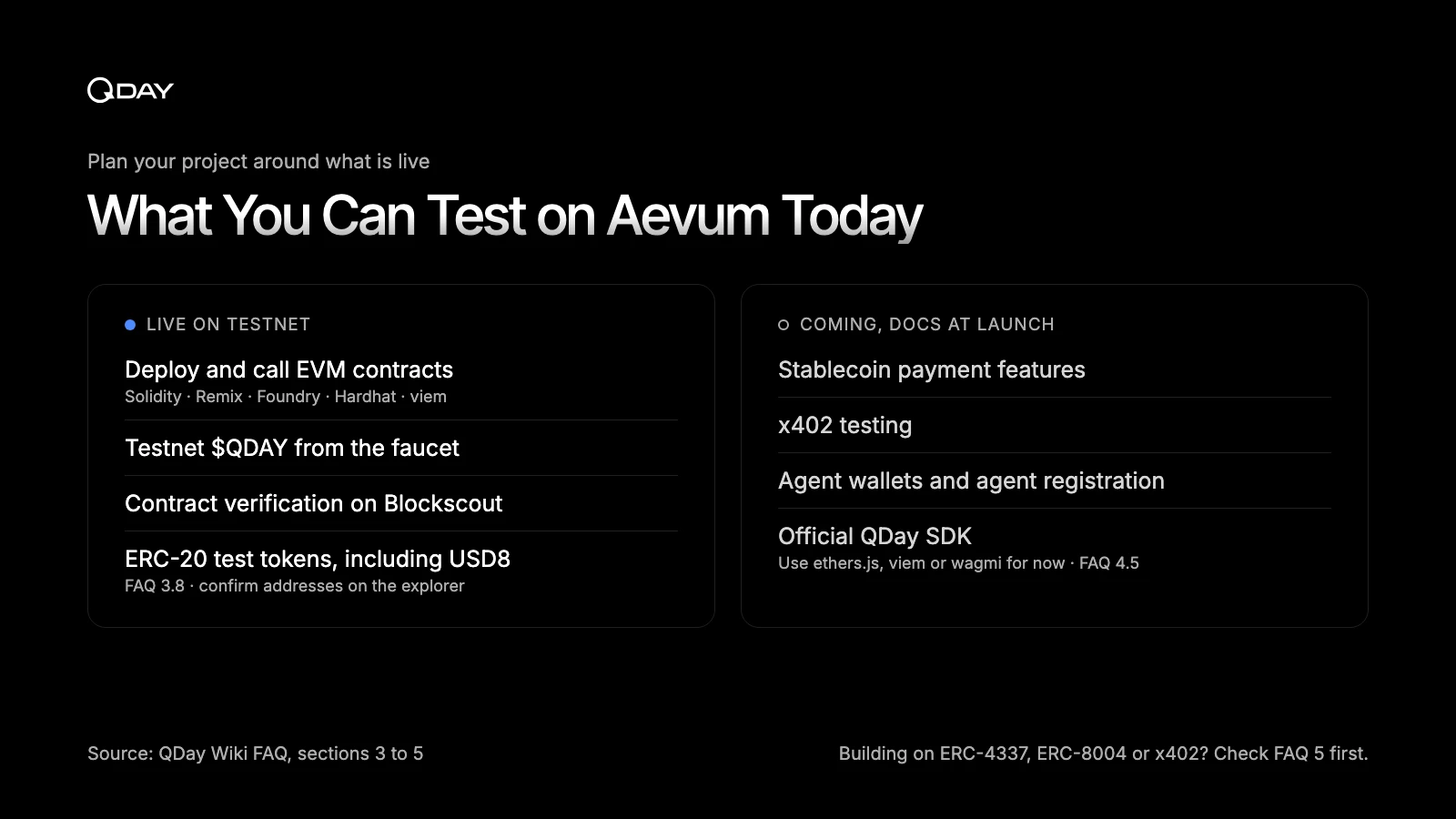
Aevum is the base for QDay’s payment and agent features, but not all of them have public tooling on the testnet today. The FAQ is direct about this.
Stablecoin payment features, x402 testing, agent wallets and agent registration are listed as coming, with documentation, tools and examples to be published when each one launches (FAQ section 5).
If you are planning a hackathon project around ERC-4337 session-scoped wallets, ERC-8004 agent identity or x402, check that section first so you know what is live.
The official QDay SDK is in the same position (FAQ 4.5).
You may see SDK package names on a few docs pages; treat those as forward-looking until the SDK is announced, and use ethers.js, viem or wagmi in the meantime.
The FAQ also lists ERC-20 test tokens on Aevum, including USD8, QDay’s USD-pegged stablecoin (FAQ 3.8).
Confirm any token address on the explorer before you build against it, and never reuse token addresses from the original network’s testnet (44003) on Aevum.
On the post-quantum side, accounts on Aevum today are standard ECDSA accounts.
QDay’s migration path runs from classical ECDSA, to a hybrid model combining ECDSA with ML-DSA-65, to native post-quantum cryptography, and Aevum is the infrastructure on which that migration can happen incrementally.
The Precompiled Contracts page previews how ML-DSA-65 and hybrid signature verification are intended to be exposed to Solidity. Treat those addresses as provisional until they are confirmed at launch.
Common mix-ups
- Adding Aevum to your wallet does not move any balances. Asset migration from the original network is a separate, one-way process, explained on the Migration overview page. Only use contract addresses published on the official contracts page and the QDay Portal.
- A contract that works on the original network does not exist on Aevum until you redeploy it there. The same goes for token and contract addresses: they are network-specific.
- Remix set to Injected Provider will deploy to whatever network MetaMask is on. Check the network name every time, not just the first time.
- The QDay team will never DM you first or ask for a seed phrase or private key. That applies to testnet "support" offers as well.
Where to go next
Everything in this guide is covered in more depth in the wiki. These are the pages most builders end up returning to:
- Add QDay to your wallet and Get testnet tokens, the two Get Started pages.
- Handbook: Getting Started, for the first-transfer walkthrough and the full Remix deployment.
- Developer Guide, covering network configuration, wallet integration, smart contract development and verification.
- Chain parameters and Official contract addresses, the reference pages to check before you sign or approve anything.
- FAQ, especially section 3 (using Aevum) and section 4 (developers). Users of the original network should start with section 2.
- Security documentation, including key management, smart-contract security and responsible disclosure.
- Developer Program, which describes grant funding for projects building on Aevum.
If something breaks, report bugs in the official QDay Telegram group (FAQ 7.6). The docs are being revised actively, so if a page is wrong or out of date, open an issue on GitHub. Every official channel is listed on the Community page.
· · ·
Once HelloQDay is live on 44005, you have everything you need to start on the project you actually came to build. When you ship it, tag @QDayOfficial on X so we can take a look.